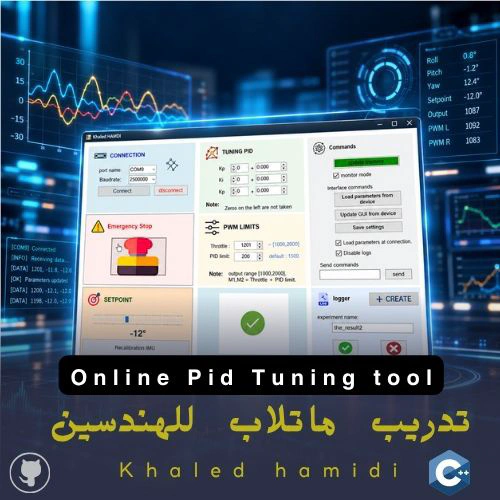
PID Tuning aVT: An Open-Source Real-Time PID Tuning & Visualization Tool

The problem I wanted to kill
Every engineer who has tuned a PID loop on a microcontroller knows this loop. It has nothing to do with control theory:
edit gains → recompile → upload firmware → wait for the board to reset → re-arm the motors → test → repeat.
Each change to $K_p$, $K_i$ or $K_d$ costs you a minute or more. On an inherently unstable plant it also costs you the state you were in: the system falls, the ESCs re-arm, and you start from zero. Tuning turns into guesswork with a slow feedback cycle. That is the opposite of what control engineering should feel like.
Commercial environments like MATLAB/Simulink External Mode or LabVIEW solve this, but they sit behind licenses and lock you into their ecosystem. Most of the open-source and academic GUI tools I reviewed are either simulation-only, tied to one specific piece of hardware, or missing real bidirectional, high-rate telemetry.
So I built my own: PID Tuning aVT, a standalone, open-source desktop tool that talks directly to the microcontroller, changes the gains while the loop is running, and shows you the response immediately.
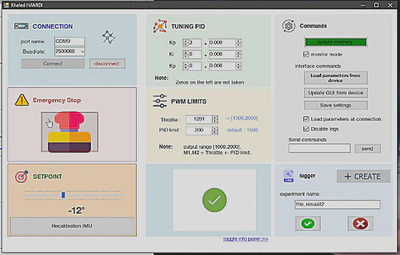
Design philosophy: the controller stays deterministic
The tool follows the Rapid Control Prototyping (RCP) idea, built on a strict host–controller split:
- The controller (an Arduino in this work) owns the control loop. It reads the sensor, computes the PID law and drives the actuators. Nothing on the PC side is allowed to sit inside that loop.
- The host (the desktop tool) owns everything human: parameter input, visualization, logging and diagnostics.
- A bidirectional serial link connects the two. Gains and commands go down, telemetry comes up, and neither direction interrupts the real-time task.
This sounds obvious. Most hobby-grade tools still break it, by making the PC part of the loop or by letting the GUI stall the data stream.
Architecture: why multithreading was non-negotiable
The first rule of a live tuning tool is that rendering must never block acquisition. If the plot takes 30 ms to redraw and the serial read waits on it, you start dropping samples. A tuning tool that lies about the system response is worse than no tool at all.
I designed the host around a multithreaded producer–consumer pattern:
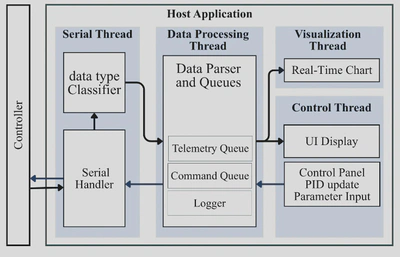
- Serial thread (producer): reads the raw byte stream, rebuilds complete lines, and classifies each line as telemetry, an informational message, or a status report.
- Data processing thread: parses telemetry into time-stamped data points and pushes them into a
ConcurrentQueue. Outgoing commands go through their own command queue. - Visualization thread (consumer): drains the queue in batches of up to 20 samples per render cycle. When the plot falls behind, it catches up in a few frames instead of building a backlog.
- Logger: a separate asynchronous writer (
BlockingCollection+ background task), so disk I/O never touches the real-time path.
That decoupling is the main reason the tool sustains 66 Hz processing with 0% packet loss, as you’ll see in the validation section.
A protocol simple enough to port anywhere
I deliberately kept the protocol plain-text, human-readable and tiny. Any microcontroller that can print() can speak it, and you can debug it from any serial monitor.
Telemetry (controller → host):
<Time_ms>:<output1>:<output2>
In the balancing platform, output1 is the measured angle and output2 is the PWM command. The meaning is up to your application. Lines starting with >> are treated as informational messages (>> System ready.), and a status request returns a framed block between STATUS_START and STATUS_END. When you connect, the GUI uses that block to load the controller’s current parameters, so the PC and the board never disagree about the active gains.
Commands (host → controller): simple key:value lines:
| Group | Command | Function |
|---|---|---|
| PID tuning | Kp: / Kpd: | Proportional gain (integer / decimal part) |
| PID tuning | Ki: / Kid: | Integral gain (integer / decimal part) |
| PID tuning | Kd: / Kdd: | Derivative gain (integer / decimal part) |
| System | target: | Setpoint |
| System | limit: | PID output saturation limit |
| System | baseSpeed: | Neutral throttle |
| System | start / stop | Start, or emergency stop the motors |
| System | reset | Recalibrate the IMU |
| System | save | Persist configuration to EEPROM |
| System | status / test | Report parameters / run diagnostics |
| Monitoring | monitor:on / monitor:off | Enable / disable telemetry streaming |
Kp:3 and Kpd:250 uses only cheap integer parsing (toInt()), and the firmware rebuilds $K_p = 3.250$ while the loop keeps running. It is a small decision, but it keeps command handling out of the control loop’s timing budget.Logging that is ready for system identification
Every tuning session can be recorded with one click. The logger writes each sample as timestamp; setpoint; angle; PWM:
41077;-5;0.46;1187
41383;-5;-1.16;1183
41690;-5;0.69;1178
41994;-5;2.35;1164
42302;-5;-0.04;1162
At the end of an experiment you mark the run as usable ✔ or unusable ✘, and the file is renamed with that suffix. It’s a small habit, but after a long day of experiments it saves hours of guessing which log was the good one. The files go straight into MATLAB:
data = readmatrix('session_20251013_153200.csv');
t = data(:,1) * 1e-3;   % time [s]
y = data(:,3);          % measured angle
u = data(:,4);          % control signal
From there you can run system identification, compare tuning iterations, or plot figures for a paper. That’s exactly how I made the figures in my publication.
Validation, part 1: Software-in-the-Loop
Before trusting the tool on real hardware, I wanted to measure the tool itself, isolated from motors, noise and microcontroller limits. I built a Software-in-the-Loop (SIL) testbed: a MATLAB model of the BLDC–seesaw plant connected to the tool through a virtual serial bridge (COM1 ⇄ COM2, 115200 bps), on a Windows 10 laptop (Intel i7-8550U) with MATLAB R2024a.
The plant was modeled with the transfer function
$$ G(s) = \frac{0.5\, L\, C_T}{J s^2 + D s} $$with $L = 0.301\ \text{m}$, $C_T = 1.46\times10^{-5}\ \text{N}\cdot\text{s}^2$, $J = 1.81\times10^{-6}\ \text{kg}\cdot\text{m}^2$ and $D = 0$.
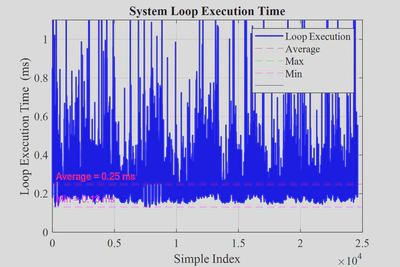
First, the virtual plant had to be trustworthy as a data source. Over 25,000 cycles, its loop executed in 0.25 ms on average, which is negligible compared with the 10 ms (100 Hz) sampling period:
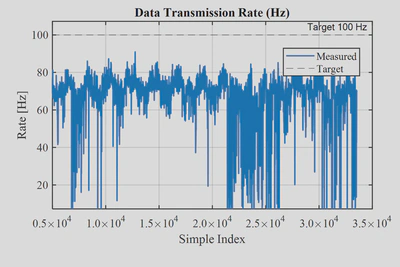
The output stream was sent from a separate loop so it would not disturb the model. Its rate topped out around 70 messages per second:
On the tool side, the numbers that matter:
| Metric | Result |
|---|---|
| Target loop rate | 100 Hz |
| Measured processing rate | 66 Hz |
| Rendering (plotting) rate | 54 Hz |
| Packet loss | 0% |
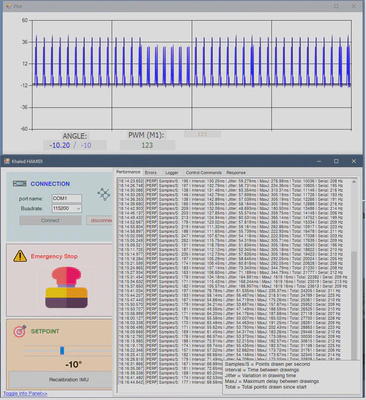
The tool processed every single sample MATLAB sent. Processing (66 Hz) and rendering (54 Hz) are close enough that the queue never builds up during long sessions, and 54 Hz is more than smooth for the human eye during interactive tuning.
Validation, part 2: the real, unstable world
A tool is only proven when it survives real hardware. The second stage used a physical dual-BLDC balancing platform that I designed and built for this purpose: an inherently unstable seesaw that emulates the pitch dynamics of a two-rotor UAV.
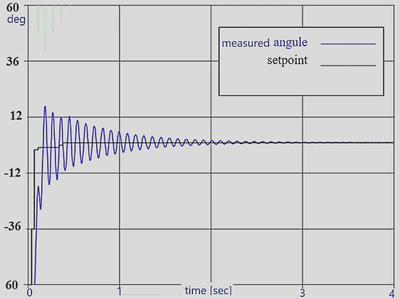
On hardware, the tool did its job. Gain changes, setpoint moves, IMU recalibration and emergency stops were applied instantly, and the effect showed up on the plot in real time. Manual tuning stopped being an edit–compile–upload cycle and became a continuous conversation with the plant.
Live visualization also showed me what was limiting the system: a control loop running at ~33 Hz instead of 100 Hz, and severe EMI from the motors in the IMU signal. The tool was built to make exactly this kind of thing visible. The full hardware story is in the platform post.
Related posts in this series
- 🛠️ Dual-BLDC Balancing Platform: the experimental plant: mechanical design, dynamics, embedded control and the EMI investigation.
- 📄 Research publication in the Turkish Journal of Engineering: research gap, methodology, results and citation.
Built to be extended
The communication layer is fully separated from parsing and visualization behind interfaces (ISerialCommunicator, IDataStreamProcessor, IPlotService). Serial is just today’s transport. The same architecture can be moved to MQTT, HTTP or WebSocket for remote monitoring without touching the core application. The protocol is controller-agnostic, so the same tool can tune a balancing rig, a DC motor speed loop, a temperature controller or a line follower.
Tech stack
- Host: C# / .NET (Windows Forms), async/await,
ConcurrentQueue,BlockingCollection - Controller: Arduino (ATmega328P),
PID_v1,MPU6050_light, EEPROM persistence - Validation: MATLAB R2024a (SIL plant, analysis), virtual serial bridge
- License: open source. Get it on GitHub.